

GDPR-First Online Proctoring
Detect AI-assisted cheating and exam irregularities without uploading video, installing browser extensions, or compromising candidate privacy.
Built for universities, certification providers, language testing organizations, and EdTech platforms.
Who ProctorSafe Is For
Universities
Secure online assessments while protecting student privacy.
Certification Providers
Maintain exam integrity while remaining GDPR compliant.
Language Testing Platforms
Monitor speaking and written exams without intrusive surveillance.
EdTech Platforms
Embed privacy-first proctoring into your assessment workflow.
Built for the Age of AI Cheating
Cheating with AI rarely happens in front of the webcam. ProctorSafe catches the traces it leaves on the page, the screen and in the room.
Answers brought back from ChatGPT
The candidate asks an assistant in another tab, window or app and pastes the answer in. ProctorSafe tells that apart from ordinary copy-paste within the exam.
AI agents sitting the exam
Text that was never typed, keystrokes faster than any person, answers clicked without the mouse moving to them.
A helper on the other end
Screen sharing, remote desktop, virtual cameras and a second voice in the room — someone else following along in real time.
Continuously evolving
We detect how an answer reached the page, not which AI wrote it. New detections reach your exams automatically — and only count toward your scores once you turn them on.
Explore Solutions
Purpose-built pages for compliance, integrity, AI detection, and remote invigilation.
GDPR-Compliant Proctoring
Data minimization and privacy-by-default for European assessments.
Learn moreOnline Exam Integrity
Secure remote assessments with signal-based review workflows.
Learn moreAI Cheating Detection
Catch answers from ChatGPT, AI agents and remote helpers — without uploading video.
Learn moreRemote Invigilation
Browser-native invigilation with no extensions required.
Learn moreWhy Organizations Choose ProctorSafe
A privacy-first exam integrity platform — not another surveillance solution.
Local Processing
Video analysis happens directly in the browser on the candidate's device.
No Video Upload
Candidate recordings remain on the device. Only integrity signals are transmitted.
No Browser Extensions
Works directly in modern browsers — no apps or extensions required.
GDPR-First Architecture
Designed around data minimization and privacy-by-default principles.
Reduced Privacy Concerns
Less intrusive than traditional proctoring — candidate-friendly by design.
Easy Integration
Embed with a lightweight SDK in minutes. Works with Moodle, Canvas, and more.
Exam Integrity Signals
Browser-native detection of suspicious behaviors and tools — with detailed audit trails for human review.
Behavioral Signals
- Face missing or multiple faces detected
- Looking away from screen
- Tab switching and window focus
- Audio anomalies and background noise
Tool Detection
- AI services contacted from the exam page
- Remote desktop software detection
- Screen sharing applications
- Virtual cameras and capture devices
Network Monitoring
- Suspicious network requests
- Unauthorized domain access
- Blocked or flagged connections
- Real-time network activity logs
Liveness Verification
- Age estimation in real-time
- Likeness comparison to reference photo
- Face presence and uniqueness verification
- Similarity score percentage match
Simple Integration, Powerful Results
Get started in minutes with our browser-native SDK.
Proctor.start({
    tenantName: 'My Test Company',
    applicationReference: 'test-taker-123456789',
    settings: {
      showPreview: true,
      monitorVisibility: true,
      detectionInterval: 1000,
      enableOfflineSync: true,
    }
});
Complete Visibility, Powerful Insights
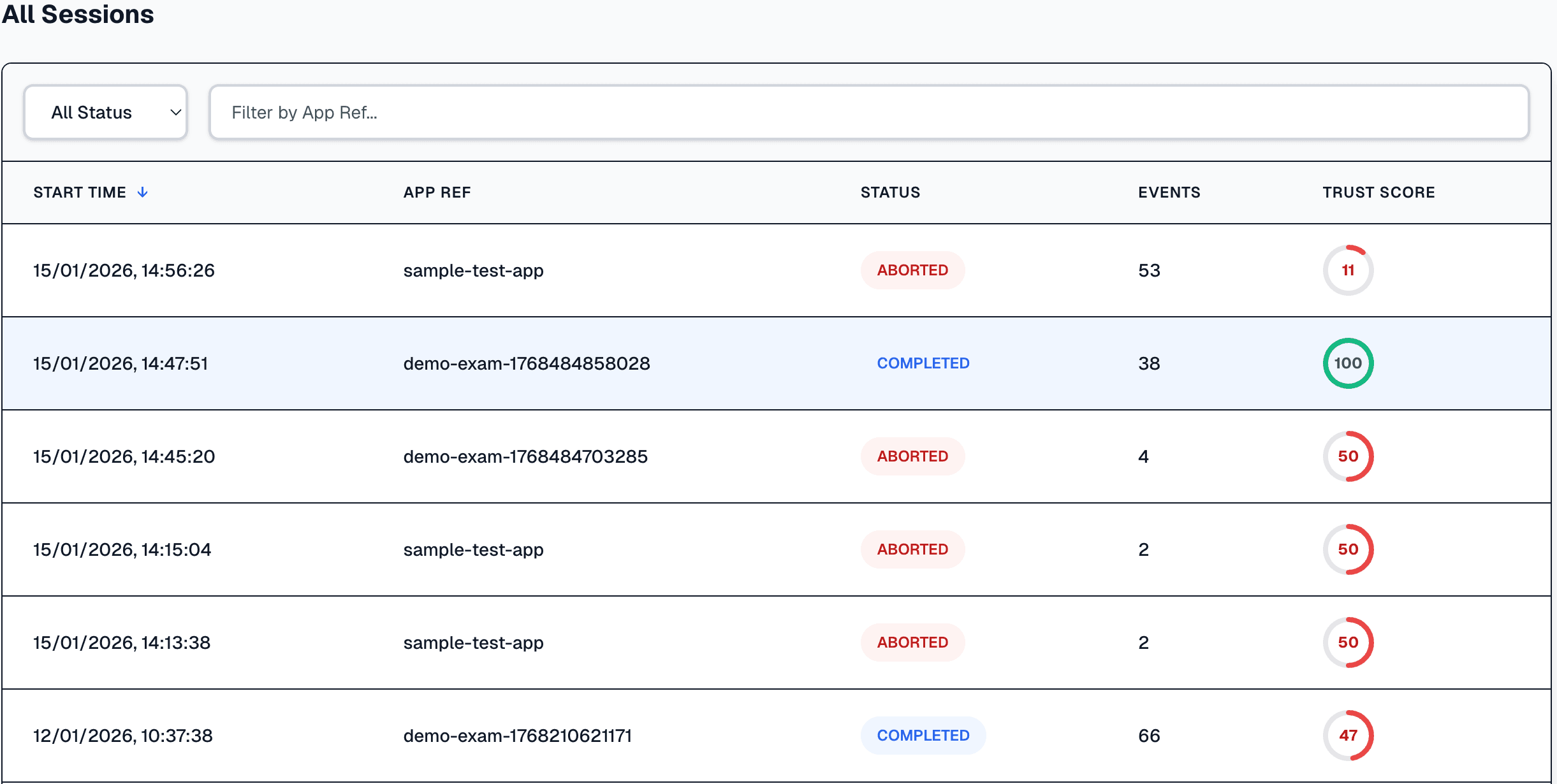
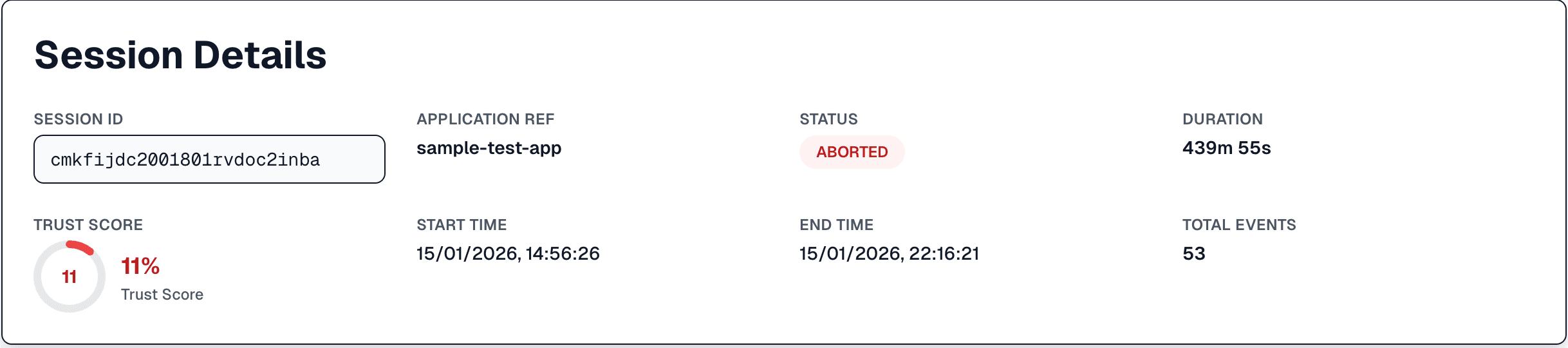
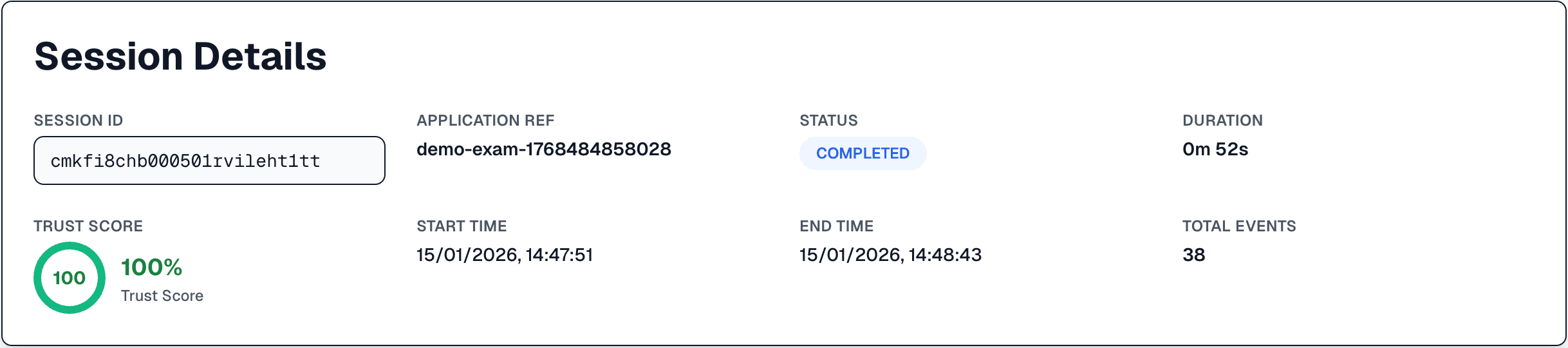
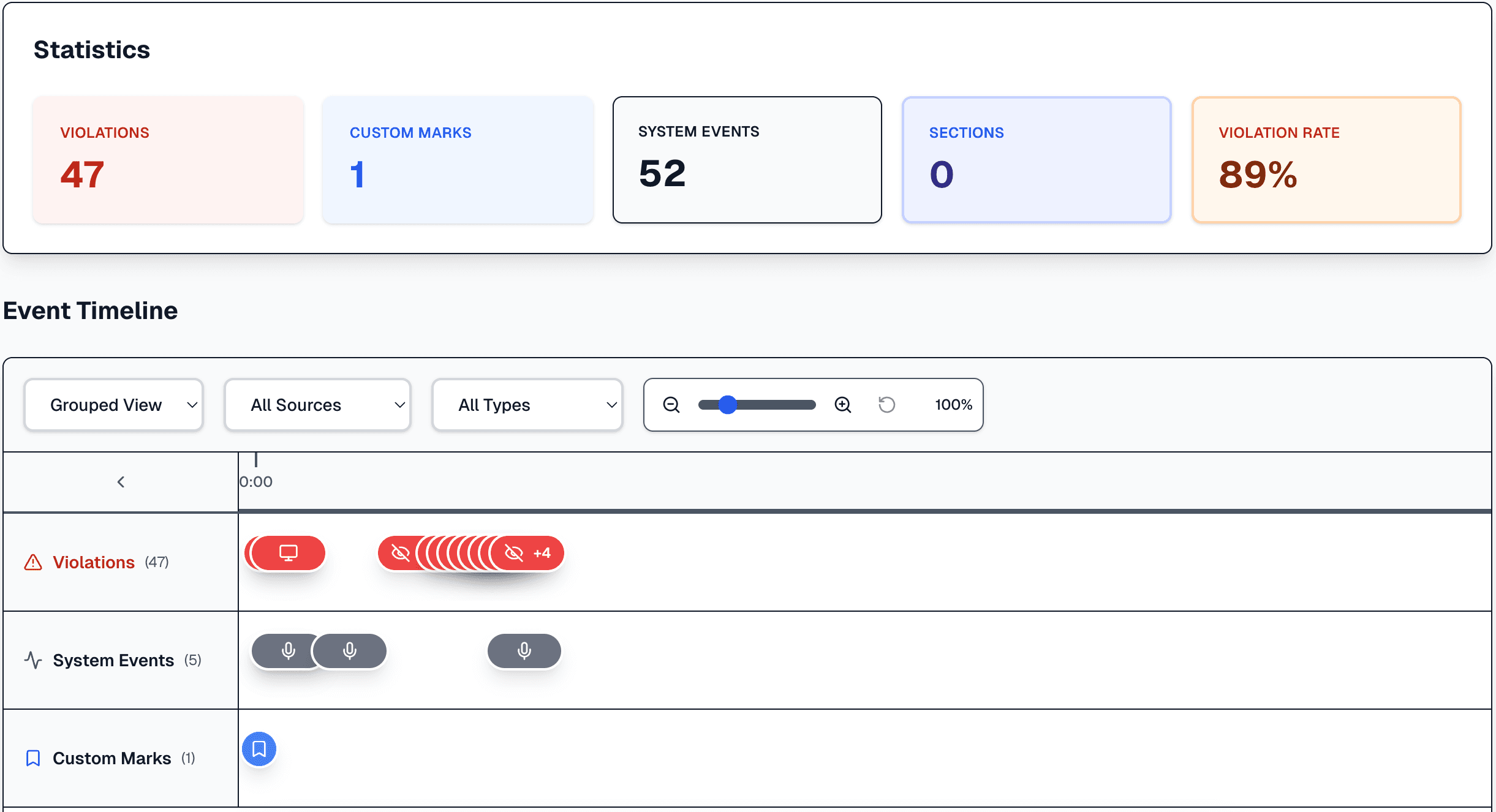
Trust scores and detailed event timelines help reviewers make informed decisions — without storing raw candidate video.
Privacy & Compliance Built-In
Data minimization and local processing are core to our architecture — not optional add-ons.
Client-Side Processing
Integrity analysis runs locally in the browser. Video streams never leave the device. Only metadata and detection events are sent to your server.
GDPR-First Design
Built around data minimization, privacy by default, and transparent processing. Designed for European compliance requirements.
Encrypted Communication
All data transmitted between client and server is encrypted. Events are signed and verified to ensure integrity.
No Session Tracking
We don't use analytics or tracking tools for proctoring sessions. Your exam data stays yours. (Our public website uses privacy-friendly analytics for page views only.)
Featured Guides
What the law requires, how on-device proctoring works, and how cheating has changed.
GDPR and Remote Proctoring: What the Law Actually Requires
A practical breakdown of which GDPR articles apply to online exam proctoring, what they require, and how ProctorSafe's architecture addresses each requirement by design — not by policy.
Technical architectureInside the ProctorSafe SDK: How On-Device Analysis Actually Works
A technical walkthrough of how the ProctorSafe SDK collects, evaluates, and transmits integrity signals — without ever uploading video, audio, or biometric data from the candidate's device.
Regulatory & complianceHow to Audit an Online Proctoring Vendor for GDPR Readiness: A DPO's Blueprint
A practical, step-by-step technical blueprint for DPOs and compliance teams evaluating remote proctoring vendors against GDPR Articles 5, 9, and 25, plus the EU AI Act.
Pedagogy & ethicsThe New Cheating Landscape: What's Actually Changed Since 2023
AI-powered contract cheating, deepfake identity fraud, and real-time exam collaboration tools have rewritten the threat model for online assessment. Here's what's real, what's overblown, and what actually works.
Frequently Asked Questions
Common questions about privacy, compliance, and integration.
Is ProctorSafe GDPR compliant?
Is video uploaded?
Does it require a browser extension?
Can it detect AI-assisted cheating?
Where is data stored?
Can it integrate with LMS platforms?
Ready to Get Started?
Start a free trial and run real sessions against your own application, try the interactive demo in your browser, or contact us for a walkthrough tailored to your program.
Questions? We're here to help.
Compare
Articles
- Does Your Proctoring Tool Infer Emotions? What the EU AI Act Bans in Education
- DPIA for Online Proctoring: A Practical Template and Checklist
- How Much Does Online Proctoring Cost? Per-Exam, Subscription and Live Pricing Explained
- Online Proctoring Without a Browser Extension: What It Means and How to Check
- Beyond Keystroke Biometrics: Privacy-First Alternatives for Remote Exam Authentication